

Buying a solid all-in-one (AIO) desktop PC can seem like a smart move. With a compact size, a small desktop footprint, and likely everything needed to get started in the box, an AIO appeals to users who want a running workstation without much hassle. Before spending money on an AIO, buyers should consider that these systems can have real disadvantages.
Compactness is typically the main priority with an AIO. That design often leaves little room for upgrades, which becomes especially problematic because these machines can often be underpowered compared to desktop towers. While their designs can be aesthetically pleasing, the compact layout may also cause overheating problems, and repairs will not be easy if something goes wrong. Owners who later decide an AIO is not right for them may also lose quite a bit of money trying to resell it.
A good AIO can still be worth the money, but its reputation as an all-in-one solution has waned. Buyers considering an AIO solely on price should know other ways exist to save money on electronics. Combining every PC component into a single machine may seem ideal, but it can create problems that a tower PC would easily solve.
Upgrades are difficult
Buyers might initially appreciate the hardware inside an AIO, but upgrading later usually means replacing the entire machine. Modern options do not all have poor specifications. For example, the Dell 24 AIO includes a 6-core Intel Core 3, a 512GB SSD, 8GB of DDR5 memory, and a 23.8-inch touchscreen display. That is likely fine for everyday users. Upgrading a component like the CPU, however, is not an option.
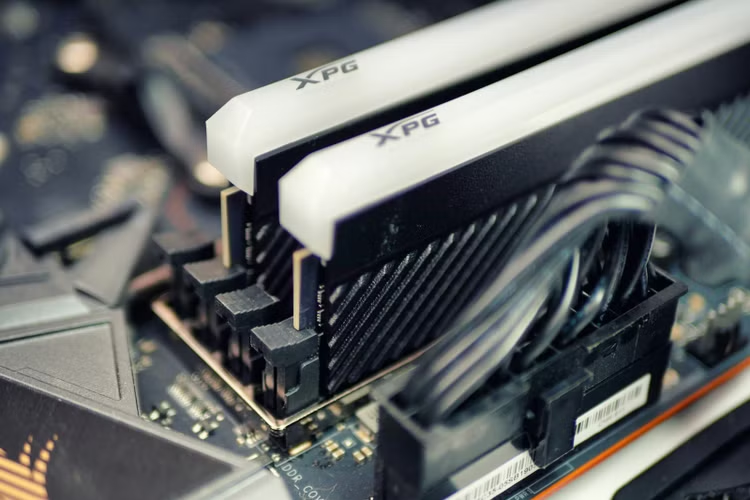
Not all modern AIOs completely lack upgrade paths, though options remain limited. On the Dell 24, users can upgrade memory and storage, but flexibility stops there. That limitation can leave owners stuck with the original specs. If a specific component fails, replacing it personally might not be possible either.
Building a PC or choosing a tower allows owners to customize hardware to whatever the motherboard supports. Anyone interested in upgrading should check what hardware changes an AIO permits, which can avoid replacing the entire machine later.
They can be underpowered
While the Dell 24 works well for everyday tasks, its specifications remain somewhat lacking. An all-in-one generally does not prioritize hardware over saving space. A good AIO typically relies on a compact design, which helps aesthetics and convenience, but often comes at the expense of performance specs.
Rising technology prices can make finding deals on towers or AIOs difficult. Buyers who search carefully can find towers like the MSI Codex R2 for around the same price as the Dell 24 AIO. The MSI includes an Intel Core i5 processor, 16GB of RAM, and a 1TB SSD. Buying a tower requires getting a separate monitor, though plenty of affordable screens are available.
Shoppers considering an AIO might want to look at laptops, which are likely to deliver similar specs with the benefit of portability. Professionals in trades or businesses that need high-end hardware should consider a tower PC or another system that is easier to upgrade. The initial convenience of an AIO looks attractive, but users might feel less satisfied once they power the machine on and test its real-world performance.
They might overheat
Electronics generally perform poorly around excessive heat. Larger PCs handle heat better through larger heatsinks, more breathing room, and improved fans. In contrast, the slim design of an AIO can present heating and cooling challenges.
A compact build can limit active cooling options and create concerns for the display. In some setups, the processor and heatsink sit directly next to the screen. While modern AIOs typically avoid this layout, certain models can remain prone to screen damage during prolonged use. AIOs with active cooling can also require more frequent fan cleanings due to narrower airflow paths and faster dust buildup.
Using an AIO does not mean tolerating extreme heat without options. Understanding why a computer overheats helps mitigate the problem. Users should keep software, drivers, and the BIOS updated, and close unused applications. Keeping the PC in a well-ventilated area and cleaning it regularly with compressed air also helps manage temperatures.
Good luck repairing it
An AIO can support everyday productivity, but a broken machine leaves few simple fixes. Desktop towers let owners swap broken components at will, which helps with both repairs and upgrades. Even an expensive AIO built with quality parts can break easily, and repairing one is often easier said than done.
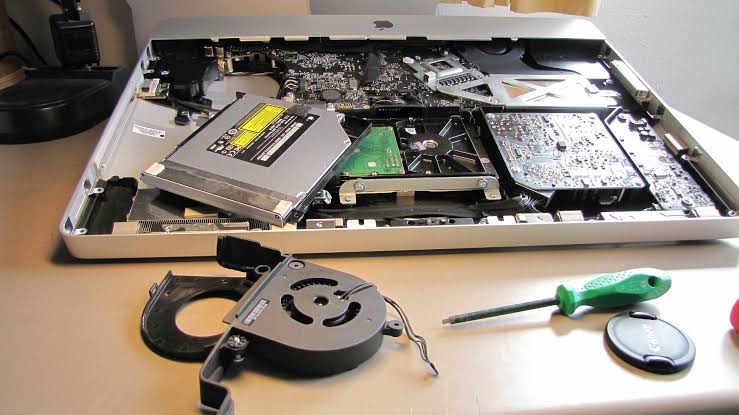
Fixing a tower PC usually involves opening the case and swapping out the failed component. Manufacturers typically do not design AIOs for easy consumer access. Opening the system can require prying apart the screen assembly, which might void the warranty. Many internal parts may also be soldered directly to the motherboard, complicating repairs further. In addition, many AIOs rely on specialty components designed for slim profiles.
A broken AIO is not entirely hopeless, but repairs will likely require a professional. Specialized parts can make professional repairs more expensive than fixing a standard tower, and work downtime adds further frustration. Still, many manufacturers offer warranties on new purchases.
Little long-term value
A computer’s value depends on what the user gets out of it. Beyond being underpowered compared to alternatives, AIOs often carry higher up-front costs than tower PCs. Because internal upgrades are rarely an option, updating components like the CPU or GPU requires buying an entirely new machine. That process is expensive, and selling the used device later can present problems as well.
The display is one of the biggest factors determining an AIO’s resale value. A machine with a 4K screen holds higher value than one with a 1080p panel, and screen scratches reduce resale pricing. How many components can be replaced and how well the thermal design keeps the unit cool also influence resale value.
Getting the best resale price often requires keeping the PC in pristine condition and saving the original packaging and accessories. For those keeping an AIO long term, resale value may matter less. A model with good components should last five to 10 years, though replacing parts remains difficult. If owners choose to keep an older system after its main service life, plenty of productive uses remain for older computers.
Editorial Ethics & Disclosure: Our evaluations, reviews, and reporting are conducted independently. Learn more about our editorial ethics and affiliate disclosures.

About Andreea Magureanu
Andreea Magureanu is a teacher by day and a tech enthusiast by passion. In her spare time, she writes about gadgets, smart devices, and everyday tech for Gadgetts - bringing a refreshingly practical, non-jargon perspective that makes technology accessible to everyone.
Related Coverage
 Laptops & PCs
How to measure your yard with Google Maps using satellite imagery
Use Google Maps' satellite imagery feature to measure your yard for free. Find distance and square footage to plan fences, landscaping, and lot projects.
 Laptops & PCs
5 Common SSD Myths You Should Stop Believing
Solid-state drives operate differently from HDDs. Learn the truth behind five common myths about M.2 drives, HDD storage, defragging, and stickers.
 Laptops & PCs
5 ways to keep your laptop cool on a budget
Learn how to keep a laptop cool on a budget with passive elevation, safer surfaces, scheduled cleaning, and simple operating system adjustments.