With little fanfare, OpenAI has made a significant advancement in ChatGPT’s development. We can now find, install, and utilize tools that increase the assistant’s functionality straight from ChatGPT’s interface thanks to the addition of a new app directory. We’ll soon see a lot more apps made especially for the chatbot as this new functionality coincides with the release of its SDK for developers.
Sam Altman had been hinting at the company’s desire to provide “all the things we would expect from a complete platform” for a few weeks. The introduction of the App Store demonstrates that ChatGPT is much more than just a text or image generator; it now enables us to engage with our apps while staying in the chat.

An app directory directly inside ChatGPT
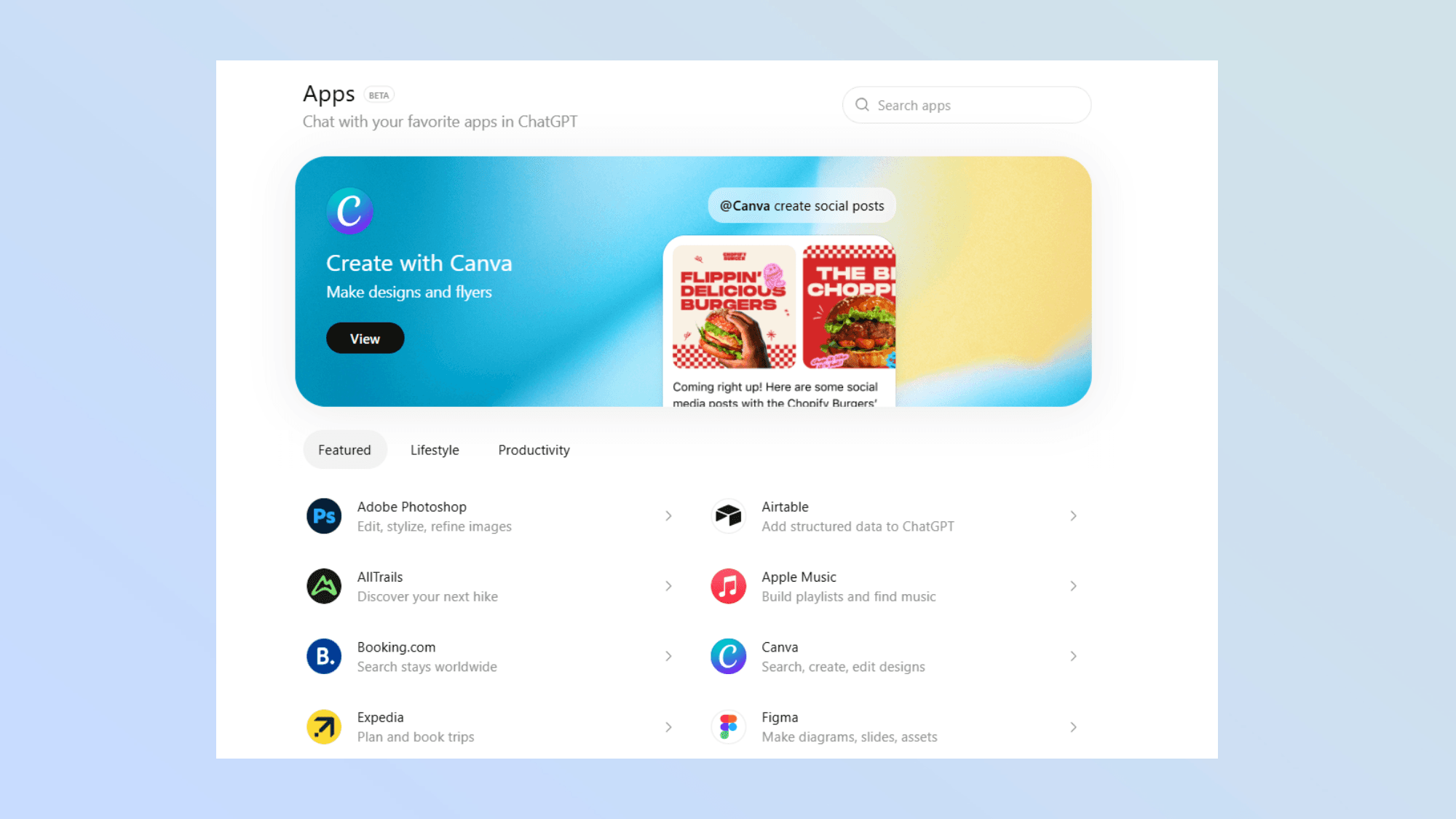
Up until recently, ChatGPT provided us with the so-called connectors, which gave us access to third-party services like Dropbox and Google Drive. These integrations have now been renamed as apps within ChatGPT by OpenAI, and a directory has been developed that we can access directly at chatgpt.com/apps or through the tools menu.
Spotify, Apple Music, Adobe Photoshop, Zillow, Canva, and DoorDash are just a few of the highlighted apps that we may explore or search for. For instance, we may use the Spotify app to ask ChatGPT to make new playlists and choose music without ever leaving the chat, while DoorDash uses AI to transform grocery lists or recipes into orders that are ready to be placed.
As if that weren’t enough, we can choose these applications from the tools menu or mention them with “-name” to activate them in the middle of a chat.
In a similar vein, OpenAI has begun to display contextual recommendations for certain applications depending on our conversation. Everything is set up so that these elements blend in organically, enhancing rather than interfering with the discourse.
How these tools work and the opportunities they create

These programs operate in a very straightforward manner. When we connect an app, ChatGPT displays its privacy policy and lets us know what information can be shared with the service (especially if we want to log in). Naturally, we can disconnect it at any time, which instantly prevents access to any data.
Developers may now create apps that are entirely native to ChatGPT thanks to the Apps SDK, which is currently in beta. According to OpenAI, the best apps are simple, easy to use, and directly address particular demands in the chat without requiring us to switch between tools. As a result, we will soon be able to plan trips, make presentations, or do our everyday responsibilities while still interacting with ChatGPT.
By doing this, OpenAI converts ChatGPT into a comprehensive platform that translates thoughts and discussions into actions. A tiny adjustment? Perhaps because it hasn’t received much attention in the tech industry, but it’s a significant move. There is a significant difference when it comes to utilizing specific programs, where we may eventually choose the ease of a command or request over navigating an interface, as well as when it comes to using the chat, where we get many new possibilities.
With ChatGPT’s App Store, we’re looking at an assistant that transforms from a text or image generator into an interactive operations hub that can link to our services and apps in the most seamless and natural way. This is a new way to engage with technology.