
By using this site, you agree to the Privacy Policy and Terms of Use.
Accept
Gadgetts
  • Smartphones
  • Wearables
  • Laptops & PCs
  • Accessories
  • Audio
  • Gaming
  • Guides
  • Smart Home
Reading: This hidden Pixel feature can significantly boost battery life
Best Deals
Font ResizerAa
GadgettsGadgetts
Search
chatgpt appstore

ChatGPT App Store explained: features, functionality, and use cases

Robert Haba
Robert Haba
19/12/2025
FacebookLike
InstagramFollow
YoutubeSubscribe
TiktokFollow
© Gadgetts.
Gadgetts > other > This hidden Pixel feature can significantly boost battery life
other

This hidden Pixel feature can significantly boost battery life

Robert Haba
By
Robert Haba
Avatar photo
ByRobert Haba
Tech Writer | Gadget Reviewer & Tech Analyst
Robert Haba is a tech writer and gadget enthusiast at Gadgetts, covering the latest in consumer electronics, smart devices, and emerging technology. With a passion for...
Follow:
- Tech Writer | Gadget Reviewer & Tech Analyst
464 Views
Last updated: 04/12/2025
Share
2 Min Read
SHARE

Is this the end of battery issues on Pixel smartphones? The November update includes a power‑saving mode that employs the always‑on display to conserve energy, providing greater screen time for navigation and daily use. Here’s how it works.

Contents
How to save battery while using Google MapsGoogle Maps Power Saver: how to turn it on

Compared to other competing smartphones, Pixel handsets are not known for having the best battery life. However, Google has progressively added intelligent features over the years to help stretch screen time. The most recent is a new Google Maps power-saving function that was added with the November update and is currently being made available to more Pixel 10 owners.
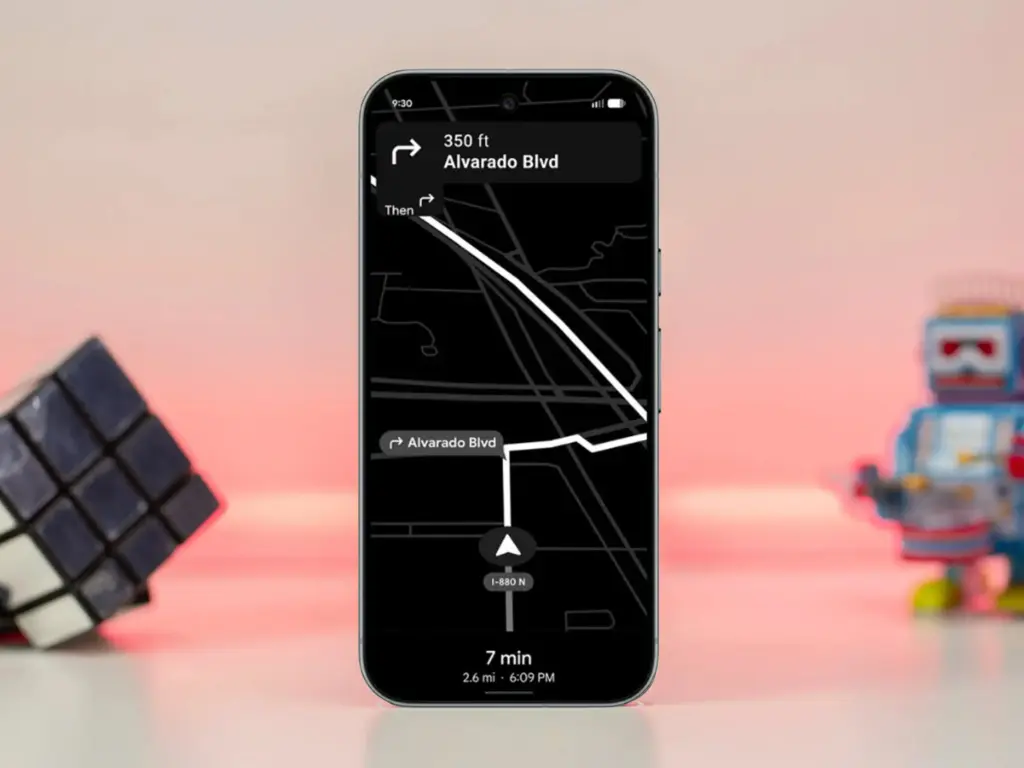
google pixel 10 pro with power saver mode maps to save battery life

How to save battery while using Google Maps

The addition, as its name suggests, offers a power saver mode to Google Maps. In theory, it makes use of the Pixel 10’s always-on display when navigating. This saves battery compared to fully utilizing the normal OLED panel, since most elements transition to black and white with inactive pixels switched off.

In addition, the mode lowers the screen refresh rate and brightness to further preserve power. Some UI components and metrics in Google Maps won’t be available when enabled, and only portrait orientation is supported.

Google Maps Power Saver: how to turn it on

If the feature is accessible on your Pixel 10 or Pixel 10 Pro, you’ll see a pop‑up card pointing you to the option in driving settings. Alternatively, you may manually activate it by going into Maps settings and finding it under driving choices.

It’s unclear why Google is limiting the feature to the Pixel 10 series, especially given earlier versions like the Pixel 9 and Pixel 9 Pro use the same LTPO OLED displays. However, it’s feasible that Google will increase support later on.

Google is also working on another battery‑saving feature for Pixel and Android devices: a smarter always‑on display that automatically shuts off when the device isn’t in use or after a specified duration.
TAGGED:batterygooglelifeltpomapsoledpixelpixel10tips
Share This Article
Facebook Copy Link
Avatar photo
ByRobert Haba
Tech Writer | Gadget Reviewer & Tech Analyst
Follow:
Robert Haba is a tech writer and gadget enthusiast at Gadgetts, covering the latest in consumer electronics, smart devices, and emerging technology. With a passion for hands-on testing and honest, no-fluff reviews, Robert helps readers make smarter buying decisions. When he's not unboxing the newest tech, he's deep-diving into how everyday gadgets can make life a little easier.
Previous Article Xiaomi 14 Ultra review 2 Xiaomi 14 Ultra to receive HyperOS 3 update — main features detailed
Next Article google pixel software update dashboard qpr1 beta 2 e1764873493280 Android 16 December update brings major upgrades to Google Pixel devices
Leave a Comment

Leave a Reply Cancel reply

Your email address will not be published. Required fields are marked *


a smartwatch with the wear os logo and some icons beside it

Wear OS 6 arrives with smarter features and noticeably better battery life

Trending

Xiaomi rolls out major Security V12 update with improved Game Turbo

The Security V12 generation of Xiaomi's standard Security app has finally been released with a…

Android 16 arrives on Samsung phones with the new One UI 8.5 update

A significant update based on Android 16 was just released by Samsung for some Galaxy…

This compact gaming mini PC packs RTX 5070 graphics and a 24-core Intel CPU

With RTX 5070/5060 laptop GPUs and Arrow Lake-HX CPUs with up to 24 cores, the…

- Advertisement -
- Advertisement -
Laptops & PCs

Apple MacBook Neo review: an affordable game-changer

Apple MacBook Neo in hand

Macs from Apple have always been thought of as pricey, high-end gadgets. Apple is obviously unable to give up its preference for high-end devices, but it is able to make…

4.5 out of 5A good choice

Your may also like!

the harmonyos computer
Laptops & PCs

HarmonyOS PCs Get a Major Boost as Linux Tools Now Run Natively

AI

Iran Issues Shocking Threat to Destroy OpenAI’s $30B AI Megacenter

intel 486 linux support
Laptops & PCs

End of an era: Linux begins removing Intel 486 support after 37 years

Apple MacBook Neo in hand
Laptops & PCs

Apple MacBook Neo review: an affordable game-changer

Gadgetts

Gadgetts is a modern tech destination that simplifies gadgets and consumer electronics for everyone, inspired by the approachable style of leading gadget sites but with a sharper focus on clarity and practical value. It should feel like a mix of trusted reviewer and helpful friend, not a faceless catalog.

Navigate

  • Contact
  • About Us
  • Affiliate disclosure
  • Cookie policy
  • Privacy Policy
  • Terms and conditions
  • Editorial Policy
Best deals

Socials

Follow US
Welcome Back!

Sign in to your account

Username or Email Address
Password

Lost your password?