Gadgetts
gadgetts logo
  • What's Hot:
  • android
  • News
  • update
  • google
  • Apps
  • apps
  • Devices
  • OS
  • News
  • Devices
  • Apps
  • OS
  • Guides
  • Code
Navigate
  • Home
  • About Gadgetts
  • Contact
  • Cookie policy
  • Privacy Policy
  • Affiliate disclosure
  • Terms and conditions
HyperOS 4 (Android 17) promises major upgrades for mobile gaming
OS
You can remove Gemini from Google apps — here’s how
Guides
Samsung cuts Galaxy S25 FE price to $499, boosting its value appeal
other
DroidLock ransomware targets Android devices to take full control
News
Reading: This hidden Pixel feature can significantly boost battery life
Deals
Font ResizerAa
GadgettsGadgetts
Search

Trending →

HyperOS 4 (Android 17) promises major upgrades for mobile gaming

You can remove Gemini from Google apps — here’s how

Samsung cuts Galaxy S25 FE price to $499, boosting its value appeal

DroidLock ransomware targets Android devices to take full control

Phone addiction signs: what people refuse to give up compared to their phones

Follow US
  • Home
  • About Gadgetts
  • Contact
  • Cookie policy
  • Privacy Policy
  • Affiliate disclosure
  • Terms and conditions
© Gadgetts 2025. All Rights Reserved.
Gadgetts > Guides > This hidden Pixel feature can significantly boost battery life
Guides

This hidden Pixel feature can significantly boost battery life

Share
2 Min Read
SHARE

Is this the end of battery issues on Pixel smartphones? The November update includes a power‑saving mode that employs the always‑on display to conserve energy, providing greater screen time for navigation and daily use. Here’s how it works.

Contents
  • How to save battery while using Google Maps
  • Google Maps Power Saver: how to turn it on

Compared to other competing smartphones, Pixel handsets are not known for having the best battery life. However, Google has progressively added intelligent features over the years to help stretch screen time. The most recent is a new Google Maps power-saving function that was added with the November update and is currently being made available to more Pixel 10 owners.
How to save battery while using Google Maps

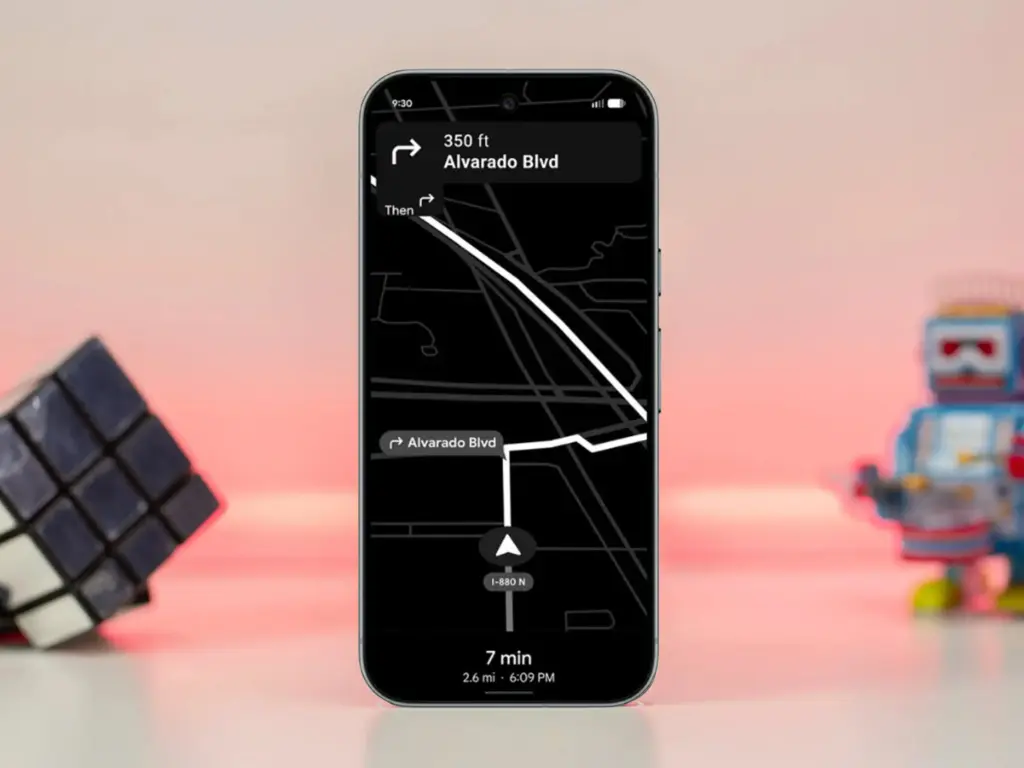
The addition, as its name suggests, offers a power saver mode to Google Maps. In theory, it makes use of the Pixel 10’s always-on display when navigating. This saves battery compared to fully utilizing the normal OLED panel, since most elements transition to black and white with inactive pixels switched off.

In addition, the mode lowers the screen refresh rate and brightness to further preserve power. Some UI components and metrics in Google Maps won’t be available when enabled, and only portrait orientation is supported.

Google Maps Power Saver: how to turn it on

If the feature is accessible on your Pixel 10 or Pixel 10 Pro, you’ll see a pop‑up card pointing you to the option in driving settings. Alternatively, you may manually activate it by going into Maps settings and finding it under driving choices.

It’s unclear why Google is limiting the feature to the Pixel 10 series, especially given earlier versions like the Pixel 9 and Pixel 9 Pro use the same LTPO OLED displays. However, it’s feasible that Google will increase support later on.

Google is also working on another battery‑saving feature for Pixel and Android devices: a smarter always‑on display that automatically shuts off when the device isn’t in use or after a specified duration.


TAGGED:batterygooglelifeltpomapsoledpixelpixel10tips
Share This Article
Facebook Copy Link
What do you think?
Love0
Sad0
Happy0
Sleepy0
Angry0
Dead0
Wink0
Previous Article Xiaomi 14 Ultra to receive HyperOS 3 update — main features detailed
Next Article Android 16 December update brings major upgrades to Google Pixel devices
Leave a Comment

Leave a Reply Cancel reply

Your email address will not be published. Required fields are marked *


You Might Also Like ↷

android 16 qpr1 beta 2 desktop mode

Desktop Mode preview spotted in Android 16 QPR1 Beta 2

WayDroid Android emulators

Forget Android emulators — this open-source alternative does it better

advanced protection

Make your phone hackproof with Advanced Protection feature

Android 15 can change the intensity of vibrations according to your environment.

Gadgetts
Facebook X-twitter Instagram
  • Home
  • About Gadgetts
  • Contact
  • Cookie policy
  • Privacy Policy
  • Affiliate disclosure
  • Terms and conditions
Reading: This hidden Pixel feature can significantly boost battery life

Gadgetts © 2019-2025